How to Reveal Hidden Timestamps in OnlyFans Bundles
OnlyFans bundles in Messages may show the number of attached videos without making the total runtime easy to see. OFDownloader helps reveal hidden timestamps OnlyFans bundles normally hide and displays the total video duration before you decide whether to unlock one.
This guide uses a bundle your signed-in account can already view in OnlyFans. It does not unlock paid media or reveal the contents of a video.
Reveal hidden timestamps in OnlyFans bundles
1. Install OFDownloader
Choose your browser or device and follow its installation guide. The guide explains the supported version, installation source, permissions, and what to do if the extension does not appear.


After installation, make sure the extension is enabled. If a license window appears, you can close it and try the supported features first.
2. Open OnlyFans Messages
Sign in through the normal OnlyFans website, then open Messages. Select the conversation containing the locked PPV bundle you want to check.
Refresh the page once if OnlyFans was already open when you installed the extension.
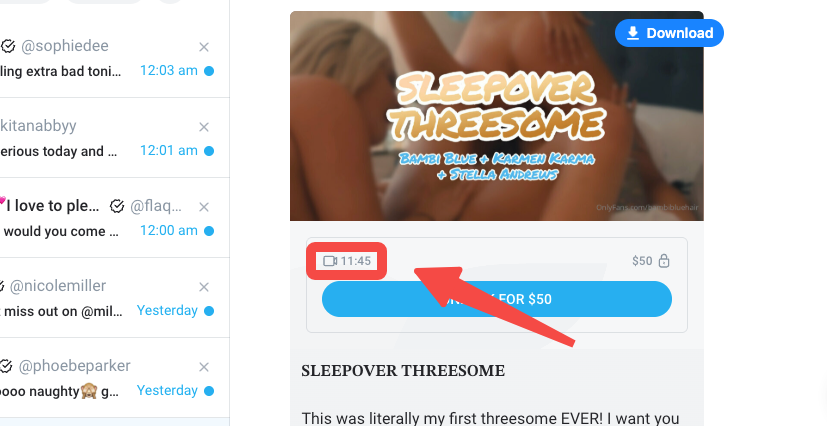
3. Check the bundle's total duration
Open the message containing the bundle. OFDownloader reads the available media timing information and shows the bundle's total duration in the Messages interface.
You can now compare the runtime with the creator's description and price before deciding whether to unlock the bundle.
What the timestamp tells you
The displayed duration tells you how much video time is included in total. It does not show what happens inside the videos, and a longer bundle is not automatically better.
If OFDownloader only shows one combined duration for a multi-video bundle, treat it as the total runtime—not the length of each individual clip.
If the total duration does not appear
Try these checks in order:
- Confirm that OFDownloader is enabled in the current browser.
- Reload the OnlyFans tab after installing or updating the extension.
- Open the message itself rather than relying on the conversation preview.
- Confirm that the bundle contains video; image-only bundles have no video duration.
- Temporarily disable another downloader or content-blocking extension that may change the page.
The OnlyFans interface can change. If the duration remains missing, include your browser and OFDownloader version when contacting support, but never send a password, session cookie, or private media.
Before and after purchasing
Use the timestamp before purchase to understand the bundle's total runtime. After purchasing, the unlocked video normally remains in the creator's message thread. See how to check a video you paid for on OnlyFans, then use the separate Messages download guide if you want to save accessible media for authorized personal use.