OnlyFans Downloader
Save videos and images you already have access to. Protected (DRM) streams have limited support.

Choose Your Preferred OnlyFans Downloader
Whether you love browser extensions or standalone apps, we've got you covered.
Desktop Client (Win/Mac)
Batch download entire OnlyFans creator libraries with blazing speed and advanced settings.
- Batch download entire libraries
- Advanced download settings
- Faster downloads with multi-threading

Chrome Extension
1-click OnlyFans video downloads directly from your browser. Installs in seconds.
- 1-click downloads directly in browser
- Lightweight and easy to use
- Automatic content detection
From Firefox Add-ons reviewers
Short excerpts from public Mozilla Add-ons reviews (linked on each card).
Mozilla Add-ons review
"Fast download speeds and no confusing setup process."
Mozilla Add-ons review
"Amazing extension, thanks for creating this"
Mozilla Add-ons review
"It worked as expected on my Firefox browser. Looking forward to future improvements."
Powerful OnlyFans Downloader Tools
We provide comprehensive solutions for all your OnlyFans downloading needs
User-Friendly Interface
Our intuitive interface makes downloading OnlyFans content easy for everyone. No technical knowledge required: simply browse and save videos with one click.
Multiple Format Support
Download videos and images you can already open. You get the highest quality the source offers for that item, often up to 4K, with no extra compression from us.
Privacy-Focused Processing
Downloads run on your device (browser extension or desktop app). We do not upload passwords, cookies, tokens, or media to our servers. License, update, and diagnostic network traffic does not carry those secrets. Details are in the privacy data-flow table.
Privacy data-flow tableAdvanced Customization
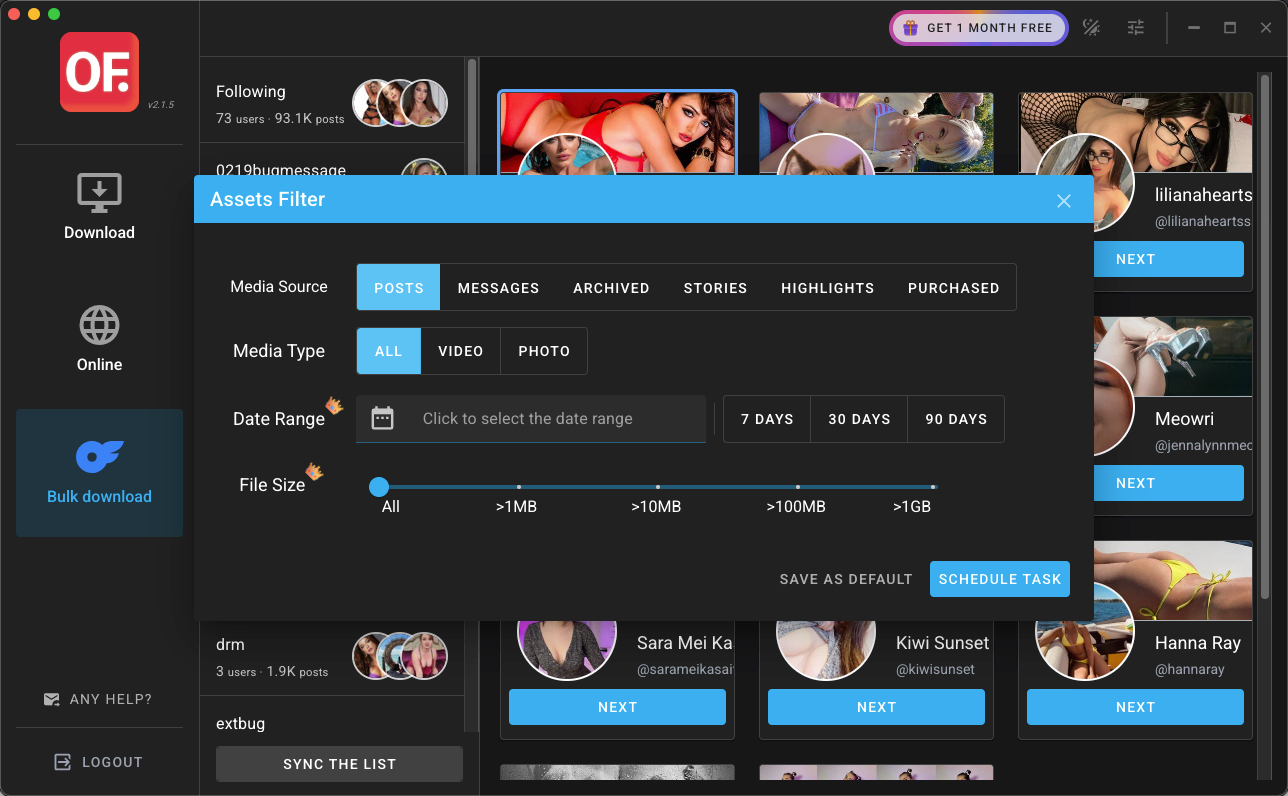
Filter OnlyFans downloads by date range, content type, and more to get exactly what you want. Our tools give you full control over your content library.
Works Everywhere
Available as Chrome extension and desktop app for Windows & Mac
Offline Access
Save your favorite OnlyFans content to watch anytime, even without internet
Outstanding Capabilities
Our most powerful OnlyFans downloading features
Support for multiple content formats
Customizable filtering by date and type
Batch downloading of entire OnlyFans profiles
Related OnlyFans Download Guides
Bulk OnlyFans Downloader
Select one creator, filter accessible content, and track a local batch download from start to finish.
OnlyFans profile picture download
View and save accessible OnlyFans PFPs, header images, and profile pictures for personal offline organization.
OnlyFans DRM download guide
Troubleshoot protected-stream download failures and choose between Chrome and desktop options.
Download OnlyFans Videos in 3 Easy Steps
No tech skills required — anyone can do it in under a minute.

Install
Add the extension to Chrome or download the desktop app.
Open OnlyFans Content
Navigate to the OnlyFans content you want to save.
Hit Download
Click the download button and save content locally.
Frequently Asked Questions about OnlyFans Downloader
Everything you need to know about our content downloading tools
OnlyFans Downloader prioritizes four key aspects: 1) Privacy - local processing, 2) User-friendliness - intuitive interface for everyone, 3) Quality - the highest the source offers, often up to 4K, with no extra compression from us, and 4) Versatility - supporting various OnlyFans content types with advanced filtering options.
Limits depend on the product and plan. The free Chrome extension is for lighter browser downloads. Where a desktop plan says unlimited image and video export, that is a quota for items the app can already save, not a promise to download arbitrary DRM-protected streams. Protected streams stay limited. Only save content you have legitimate access to.
No! OnlyFans Downloader is designed to be hassle-free. You can use all our downloading tools without registration or account creation. Simply install the extension or app, select the content you want, and download.
Downloads run on your device. We do not upload passwords, cookies, tokens, or media to our servers. License, update, and diagnostic network traffic does not carry those secrets. The extension and desktop app do not include Microsoft Clarity, Plausible, or the website Google tag; those run on this website only. Details are in the privacy data-flow table.
Privacy data-flow tableYou get the highest quality the source makes available for that item, often up to 4K. OFDownloader does not add a further compression step. We do not promise that every file is the creator’s exact upload, or that 4K is always offered.
Using our OnlyFans downloader to save OnlyFans content that you have purchased or have legitimate access to is generally for personal use. However, it's crucial to respect copyright laws and creator rights. Always use the OnlyFans downloader responsibly and never distribute downloaded content from OnlyFans.
Ready to Save Your Favorite OnlyFans Content?
Install the extension or desktop app and save only content you have legitimate access to
Downloads stay on your device. We do not upload passwords, cookies, tokens, or media to our servers. Only save content you have legitimate access to.