How to Search for My Favorite Creator on OnlyFans
If you already know a creator but keep losing their profile, select the star on their profile. OnlyFans saves starred creators in Collections, giving you a private shortcut back to the profile.
This is different from loving a post: the profile star saves a creator to Collections, while the heart button only marks that individual post as Loved.
Search for my favorite creator on OnlyFans
1. Open the creator's profile
Open the creator from your feed, Messages, subscriptions, or their direct profile link. Check the username so you do not favorite an impersonating account with a similar display name.
2. Select the star
On desktop, look for the star on the right side of the creator's profile header. Select it to save that creator to Collections.
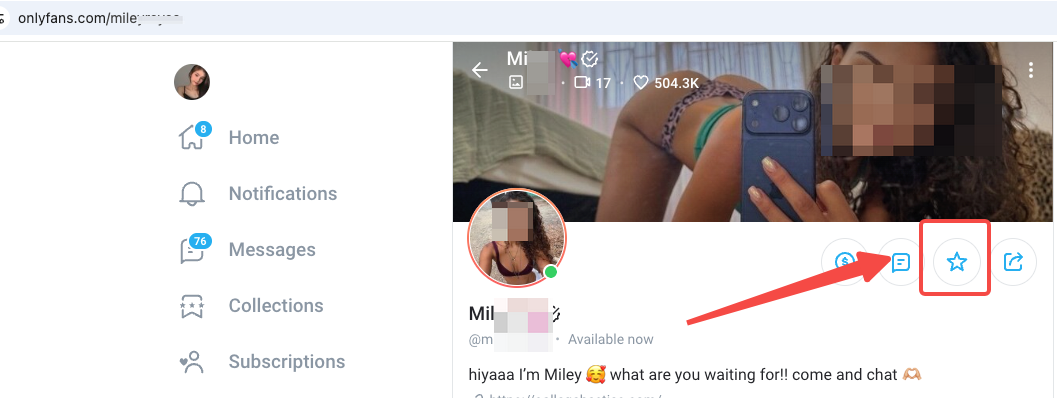
Select the star highlighted in the screenshot. The exact position can move when OnlyFans changes its layout.
The star changes state after the creator is saved. Selecting it again removes the creator from your saved collection; it does not cancel or renew a subscription.
3. Find the creator again
Open Collections from the left navigation. On mobile, open the navigation menu first and then choose Collections. Your starred creators appear there; select one to return to their profile.
This is the important distinction: the star is the save action, while Collections is where you find the creators you starred.
Collections, subscriptions, and post reactions are different
These OnlyFans areas solve different problems:
- Collections: Return to creator profiles you saved with the star.
- Subscriptions: See accounts connected to your current subscriptions.
- Loved posts: Select the heart to Love one post. This does not star the creator's profile.
Star a creator or Love a post?
| What you want to save | Feature to use |
|---|---|
| A creator's profile | Select the profile star, then open Collections |
| One feed post | Select the heart to Love the post |
| A PPV video sent in a message | Return to the creator's message thread |
If you are trying to recover media rather than a profile, use the guide to check a video you paid for on OnlyFans.
If your favorite creator is missing
First confirm that you are using the same OnlyFans account and that the profile star was not selected again accidentally. Then open Collections and refresh the page. A creator may also have changed their username, paused the account, or deleted the profile.
Starring is an organization tool, not a permanent copy of a profile. Outside OnlyFans, saving the creator's current username in a private note or browser bookmark is a useful backup when the account matters to you.